
Digital marketing has become the new service bay for every auto repair shop owner. When a potential customer’s check-engine light comes on, the first stop usually isn’t your parking lot — it’s a search engine. Drivers read online reviews, compare prices, and check Google Maps before deciding where to book their brake repair or oil change. If your shop’s website, Google Business Profile, and ads aren’t visible or persuasive, those drivers roll right past your doors to a competitor down the street.
That’s why mastering Google Analytics for auto repair shops isn’t a luxury; it’s the diagnostic tool that tells you exactly how visitors discover, explore, and click on your site. By turning website traffic into valuable insights, you can fine-tune local SEO, adjust your marketing strategy in real time, and make data-driven decisions that fill bays with the right jobs.
What Is Google Analytics?
Google Analytics is a free-to-use web analytics service that tracks and reports on website and app traffic. It enables businesses to understand user behavior, marketing performance, and return on investment (ROI). The latest version — Google Analytics 4 (GA4) — goes beyond page views to map the entire customer journey, from a driver’s first Google Ad impression to the moment they tap your click-to-call button.
At a glance, GA4 shows you who’s finding your auto repair shop online, which search terms or social posts spark their interest, and how effectively your pages convert browsers into booked appointments. By surfacing user behavior, marketing performance, and ROI in one intuitive dashboard, the platform empowers you to diagnose weak spots, double down on winning tactics, and refine local SEO.
The right Google Analytics strategies can push your auto repair business to the top of search results and keep your bays bustling.
Setting Up Google Analytics
You don’t need to be a software engineer to wire GA4 into your website. Many shop owners can finish the basic setup over a lunch break. Follow these steps and you’ll start collecting data before the next vehicle rolls off the lift.
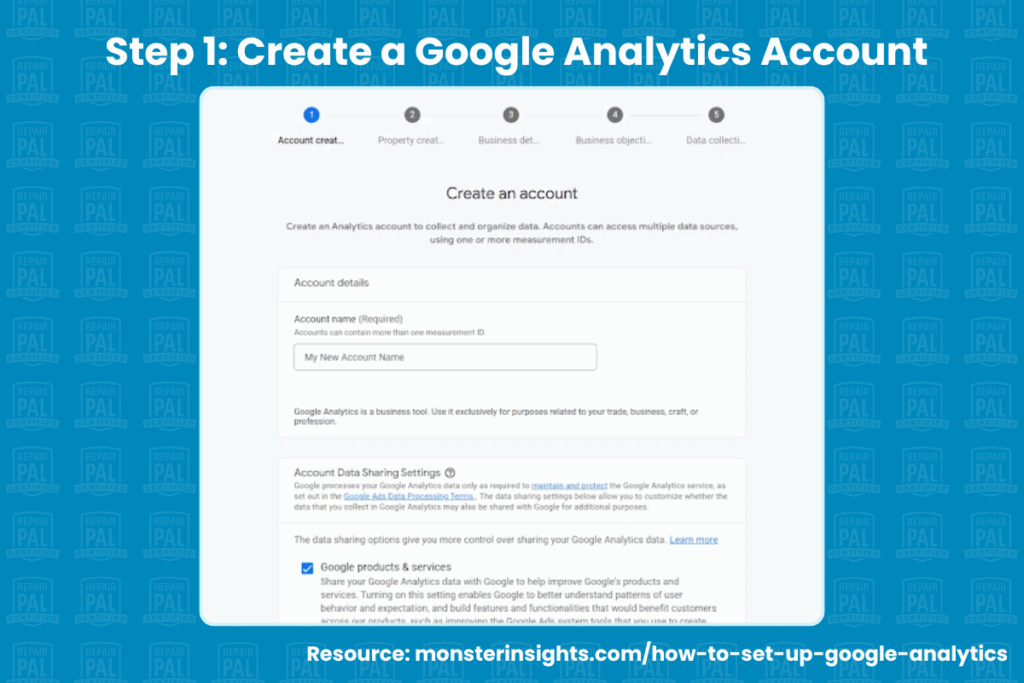
Create a Google Analytics Account
Visit analytics.google.com and sign in with the same Google credentials you use for Gmail or your Google Business Profile. In the Admin panel, choose “Create Account” and give it a clear name such as “Main Street Auto Analytics”.
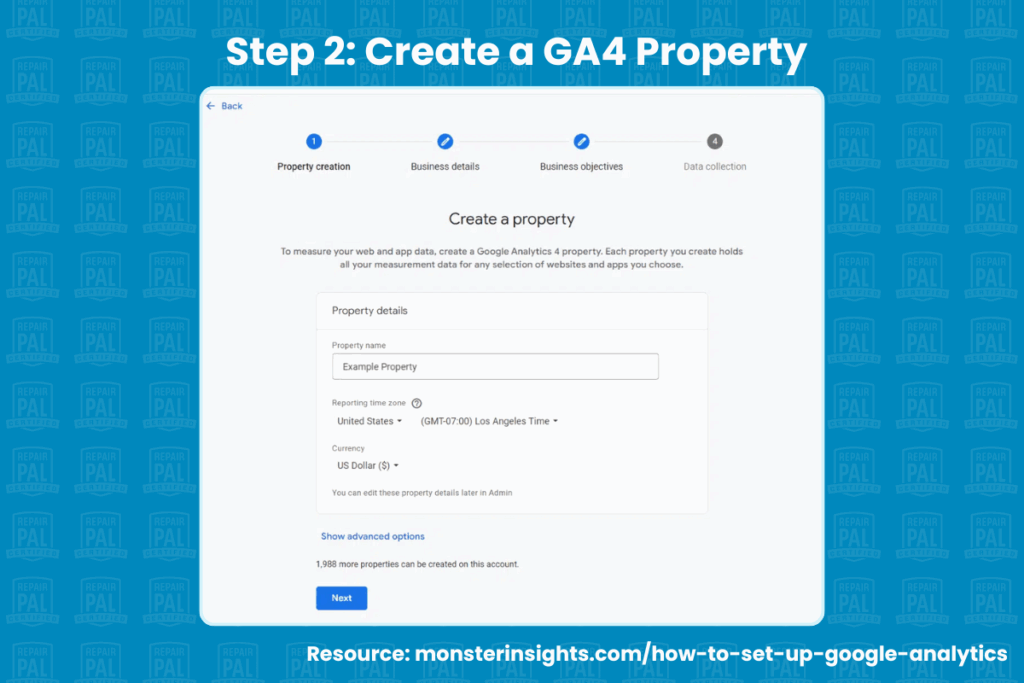
Add a GA4 Property
Still in Admin, select “Create Property.” Enter your shop name, pick the correct U.S. time zone, and set the currency to USD. Then, confirm the property type is GA4 so you benefit from event-based tracking and predictive insights.
Free Download
Lead Generation Tips for your Repair Shop Business
 Learn more digital marketing strategies with our Free Guide, Lead Generation Tips for Your Repair Business
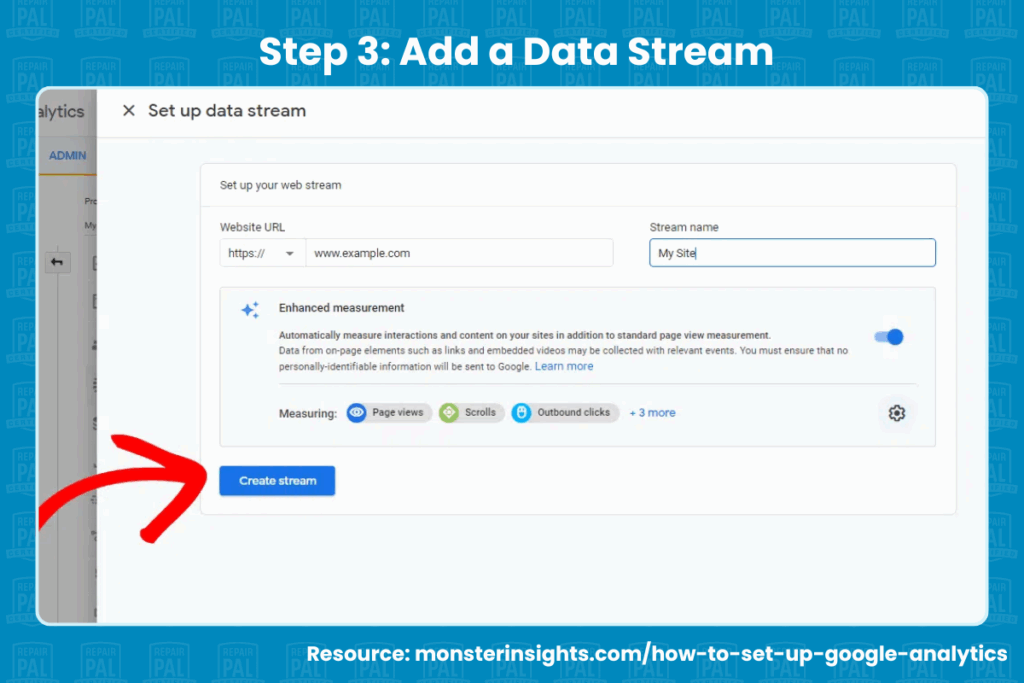
Launch a Web Data Stream
Choose “Web” as the platform, paste in your site URL, and label the stream. Something like, “Shop Website” will work fine. GA4 will generate a unique Measurement ID that keeps every visit tied to your property.
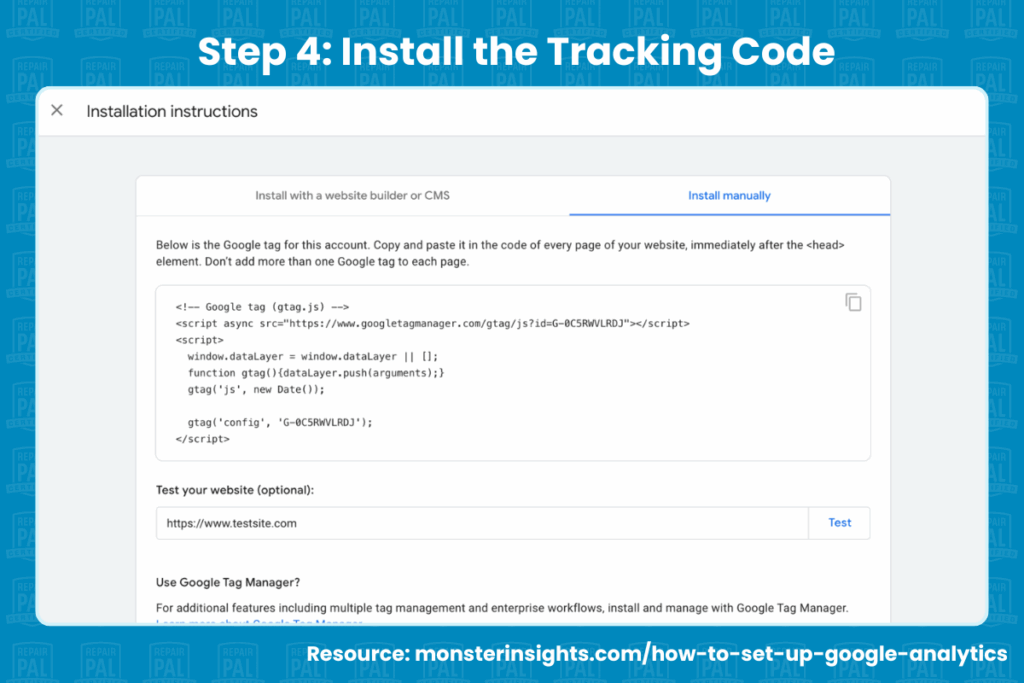
Install the Tracking Code
If you manage your own site, place the global site tag snippet in the “<head>” section of every page. And if you use WordPress, Wix or Squarespace, you can enable the built-in Google Analytics integration and drop in the Measurement ID. If you rely on a web vendor, you can email them the code and ask for confirmation once it’s live.
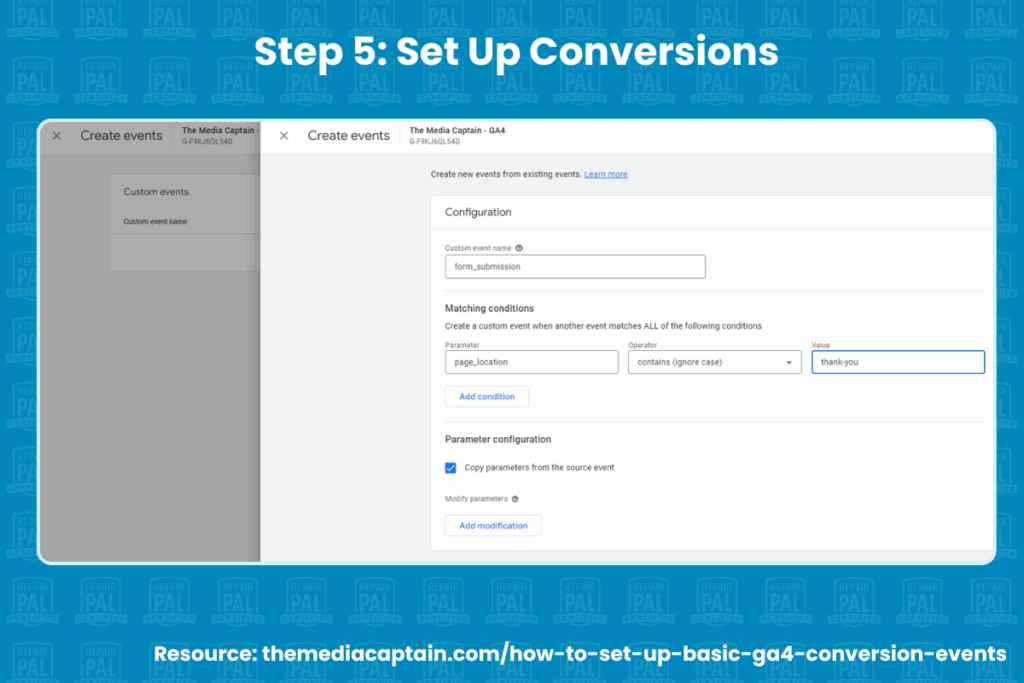
Define Conversion Events With Clear Naming Conventions
Navigate to “Admin > Conversions > New Conversion Event.” Use straightforward, lowercase names with underscores; for example, “phone_click, form_submit, appointment_booking.”
Mark each one as a primary conversion so GA4 highlights them in every report and avoids accidental duplication.
Configure Reporting Views and Filters
Set internal traffic filters to exclude your own shop computers and mobile devices. Then, enable enhanced measurement so GA4 automatically tracks scrolls, outbound link clicks and site search queries.
You should also activate Google signals if you obtain user consent for personalized ads. Make sure your privacy policy clearly discloses analytics tracking and offers an opt-out to comply with evolving state privacy regulations.
Integrate Other Google Properties
Link GA4 with Google Ads to import cost data and build remarketing lists. You can also connect Google Search Console for side-by-side organic keyword and on-site engagement reports. Then, verify your Google Business Profile so call and direction clicks from the map feed directly into acquisition reporting.
These steps turn GA4 into a real-time command center that shows which marketing channels fill your schedule and which ones burn cash. If you need a refresher on why GA4 is a critical tool for boosting SEO, our in-depth guide walks through additional features like cross-domain tracking, predictive audiences, and automated insights.
How To Measure Conversions
A steady flow of website visitors is great, but only conversions keep your bays profitable. GA4 gives you a clear window into every interaction that moves a potential customer closer to scheduling service. Below are five focal points to help you measure what matters.
User Traffic Sources
Start by learning where shoppers come from. GA4’s acquisition reports break out Google Search, social media, paid ads, Google Maps, and referral traffic so you can see which channels consistently attract high-intent visitors. Add UTM parameters to paid campaigns for cleaner attribution and enable auto-tagging in Google Ads to understand keyword-level ROI.
Conversion Tracking
Form submissions, click-to-call taps, and online booking requests reveal real buying intent. Set each of these actions as a primary event so GA4 treats them like the finished repair order they are. When you measure the right metrics, you’ll understand whether people who land on your site actually reach out and which marketing dollars influenced the decision.
Top-Performing Pages
Not every service page pulls the same weight. GA4’s landing page report underlines which offerings — transmission repair, AC diagnostics, brake repair, etc. — draw the most traffic and conversions. Pair that insight with on-page heat-mapping tools to see where visitors hesitate, then refine copy, add stronger calls to action, and feature customer reviews at decision points.
Local SEO Impact
Pair GA4 data with Google Search Console impressions and ranking reports to see how tweaks to title tags, meta descriptions, and structured data move you up the local pack. Monitor clicks coming from Google Business Profile URLs to quantify how visibility in Google Maps translates to booked appointments.
Audience Behavior
Dwell time and pages per session tell you if visitors are finding the information they need or bouncing after a quick glance. Longer sessions signal that your content addresses common concerns, while high bounce rates might point to slow load times or confusing navigation. If you suspect design issues, double-check that your site delivers the right website features, such as mobile-friendly layouts and fast page speeds.
Performance Analysis and Optimization
Collecting numbers is only half the job; the real payoff comes from turning reports into revenue. After a few weeks of data collection, open GA4’s reports and look for patterns that answer three questions:
- Which channels drive quality leads?
- Where do visitors abandon the journey?
- What content convinces them to book?
Identify quick wins by comparing conversion rates across traffic sources. If organic search brings in twice as many appointment requests as paid social, shift budget toward local SEO and Google Ads that mirror high-performing keywords. Next, use the Path Exploration tool to visualize common user journeys. If many drivers land on your brake repair page yet exit before scheduling, tighten the copy, add a customer testimonial, and insert a clear “Schedule Now” button near the fold.
By analyzing data, applying insights, and testing improvements, you’ll refine every part of the funnel and invest only in tactics proven to attract high-quality customers.
FAQs About Google Analytics for Auto Repair Shops
Here are some frequently asked questions about Google Analytics and auto repair:
What Lead Actions Should an Auto Repair Shop Track?
Prioritize any interaction that signals a driver intends to do business with you. The essentials include phone clicks, appointment bookings, contact-us form submissions and live-chat conversations. Tag each as a primary event in GA4 so the platform highlights how many potential customers reach these milestones and which marketing channels influenced them.
Which GA4 KPIs Best Indicate Traffic and Lead Quality?
Focus on engagement rate, average engagement time, and conversion rate. Together, they reveal whether visitors are simply browsing or seriously considering your car repair services. A high engagement rate paired with a strong conversion percentage usually means your messaging resonates with the right audience.
How Should Repair Shops Use Data To Inform Marketing Initiatives?
Let performance gaps guide your next move. If organic search delivers most booked jobs, double down on local SEO and fresh content. Should Google Ads generate clicks but few conversions, refine ad copy, tighten keyword targeting, or direct traffic to a more persuasive landing page. Data-driven tweaks keep budgets lean and lift ROI across every marketing strategy.
How Often Should You Review Google Analytics Data?
Check high-level dashboards weekly to catch sudden drops in website traffic or spikes in bounce rate. Conduct a deeper audit each month to compare channels, evaluate seasonality, and spot emerging trends. Quarterly reviews are ideal for setting bigger goals, such as lowering cost per acquisition or expanding into new auto repair services.
What Does a High Bounce Rate Mean for an Auto Repair Shop Website?
A consistently high bounce rate can signal slow load times, confusing navigation, or content that doesn’t match search intent. Start by running a speed test, then audit on-page copy to confirm it answers the question that brought the visitor there. For additional guidance, see our tips on optimizing your website so it keeps shoppers engaged until they book a service.
Drive Leads, Drive Conversions
Google Analytics turns anonymous clicks into actionable insights, showing which campaigns pack your bays, which pages persuade drivers, and where potential customers lose interest. Armed with that clarity, you can fine-tune local search, sharpen every Google ad, and deliver a website experience that converts traffic into loyal patrons.
Ready to put data to work for your auto repair business? Discover how Google Analytics can help you make data-driven decisions, improve customer experience, and ultimately attract more customers.